Property management
When management changes: who owns the property's website, domain, Google listing and photos
The property owner should hold the accounts and files that belong to the property: the domain, the website and its content, the Google Business Profile, the analytics, and the design and sign files. The incoming manager should be added as a user of each, and the outgoing firm removed only after the new access works. Photographs are the item most often misunderstood, because unless the photographer signed a written transfer, the photographer usually keeps the copyright and the property's use depends on the license.
Why the handoff goes wrong
A property's online presence is usually assembled by whoever was there at the time. The previous manager registered the domain on the firm's account, a leasing agent verified the Google profile with a personal email address, the photographer delivered files to the manager with a license in the manager's name, and the brochure exists as a PDF whose source files sit on a designer's drive. None of that is a problem while the relationship lasts. When management changes, each item becomes a separate request to someone with little reason to prioritize it.
The consequences are practical. A domain renewal notice goes to a mailbox nobody reads and the property's website goes offline. The Google profile shows the old manager's phone number for months. The new leasing brochure cannot reuse the old photographs because nobody can show a license that covers the new firm. The fix is an inventory, a handoff order, and a clause in the next management agreement.
This guide is written for both sides: owners who want to keep control of their property's public information, and incoming managers who need access on day one. It touches on contracts, copyright and platform rules, and it is general information rather than legal advice.
The handoff checklist
| Asset | Who usually holds it | What to request | Risk if missed |
|---|---|---|---|
| Domain registration | The outgoing manager's or an agency's registrar account | Change of registrant to the ownership entity, or a transfer authorization code | Expiry, or a site the owner cannot move |
| DNS | The registrar or a separate DNS provider | An export of all records, including mail records | Email and the website stop working after a move |
| Hosting and website login | The outgoing manager or its web vendor | Administrator access, a full content export and the hosting contract | Lost pages, photos and tenant documents |
| Email on the property domain | The outgoing manager's mail system | Forwarding for leasing and tenant addresses during the transition | Missed tenant and leasing messages |
| Google Business Profile | An individual's Google account | Owner access for the ownership entity, then primary ownership | Old contacts and hours on Maps for months |
| Search Console | The outgoing manager or vendor | Owner access, then removal of old verification tokens | Former owners can re-verify their access |
| Google Analytics | The outgoing manager's account | A property move to the owner's account, or administrator access | Loss of historical traffic data |
| Photography and video | The photographer, licensed to whoever commissioned it | The license terms, or a written assignment, plus the edited files | New materials cannot legally reuse the images |
| Brochure and leasing package | A designer or the leasing broker | Source files with fonts and linked images, not only the PDF | Every update means rebuilding from scratch |
| Site plan | An architect, a designer or the manager | The editable file and the suite numbering key | Plans that disagree with leases |
| Directory and pylon sign files | The sign contractor or the manager | Vector artwork for each panel and the city sign program approval | Mismatched replacement panels |
| Portal listings | The listing broker's or manager's LoopNet and Crexi accounts | Removal or update of each listing, and a list of what was posted | Leased suites and old contacts still published |
| Phone numbers on signs | The outgoing firm's phone system | A port or forward of the number, or new signs | Calls from drivers go unanswered |
| Social and review profiles | An employee of the outgoing firm | Administrator access for the owner | Pages nobody can update or close |
| Tenant documents | The manager's website or shared drive | Current rules, insurance requirements and forms, with dates | Tenants working from outdated versions |
Domain, DNS and hosting
The domain is the most important item because everything else points at it: the sign, the brochure, the Google profile and the email addresses tenants use. Check two things with the registrar. The first is who the registrant is, meaning the person or entity the registration record names as the holder. The second is whose account the domain sits in, which is the login that controls renewals and settings. The ownership entity should be the registrant, and ideally the account holder too, with the manager or agency added as a technical contact or user. We explain the reasons in domain names for property websites.
If the domain has to move to a different registrar, ICANN's Transfer Policy governs the process. It requires a registrar that does not offer self-service to provide the transfer authorization code within five calendar days of the registrant's request. It also blocks transfers to another registrar for 60 days after a domain is registered or transferred, and requires a 60-day transfer lock after a change of registrant unless the registrant opted out beforehand. ICANN's working group on the Transfer Policy has recommended changes to some of these periods, so confirm the current rules with the registrar before you plan dates around them. A change of registrant within the same registrar is often the simpler first step.
Before anything moves, export the DNS records. Many property domains carry mail records for leasing and tenant addresses, and moving the website without them can stop email at the same time. Then confirm the renewal date, turn on auto-renewal with a payment method the owner controls, and send renewal notices to an address that will survive the next change of staff.
For hosting, ask for administrator access and a complete export of the content, including images and documents. If the website runs on the outgoing firm's own platform, which is common for portfolio sites, the owner may only be able to take the content rather than the site itself. Knowing that early decides whether the new manager needs a new website.
Google Business Profile
Google's help center sets out three roles. A profile has one primary owner, and can have additional owners and managers. Owners can add and remove users; managers can edit the profile, respond to reviews and post, but cannot add or remove users or remove the profile. The arrangement that survives a change of management is the ownership entity as primary owner, with the property manager, leasing broker and on-site staff as managers.
To move a profile, the current primary owner adds the new party as an owner and then transfers primary ownership; only the primary owner can do this. New owners and managers wait 7 days before they can remove other users or change primary ownership, so plan the handoff with that week in mind and do not remove the outgoing firm until the new access is confirmed. If the outgoing party does not respond, Google's request ownership process notifies the current owner, who has 3 days to reply. Without a response, you may be offered the option to claim the profile, although Google says that option is not always available.
Once access is settled, update the phone number, hours, website link and photos. The full setup for a center is in Google Business Profile for shopping centers.
Photographs, video and design files
Paying for photography does not by itself make the property owner the copyright owner. The U.S. Copyright Office explains that a work is a work made for hire only if it is made by an employee within the scope of employment, or if it is specially commissioned in one of nine statutory categories under a written agreement signed by both parties. Commissioned property photography by an independent photographer often falls outside those categories. Separately, a transfer of copyright ownership is not valid unless it is in writing and signed by the owner of the rights, under 17 U.S.C. Section 204(a).
In practice, most property photographs are used under a license, and the license decides who can use them and how. Ask for the license terms and check three things: who the licensee is (the ownership entity, the management firm or the broker), whether the license covers use by future managers and brokers, and whether it covers the website, print, portals and advertising. If the license names the outgoing manager, ask the photographer to reissue it to the ownership entity. For new shoots, have the license or an assignment name the ownership entity from the start. Our photography guide covers the shoot itself.
Design files need the same attention. A leasing brochure delivered only as a PDF has to be rebuilt for every update, so ask for the source files with their linked images. Font licenses usually belong to whoever bought them, so the incoming designer may need to license the fonts separately. Ask the sign contractor for the vector artwork of each directory and pylon panel, and keep the city's approved sign program with it, because replacement panels have to match.
Website analytics and Search Console
Historical traffic data is useful to the next manager and easy to lose. In Google Analytics, a property can be moved to another account by someone with the Administrator and Editor roles on both the source and destination accounts. Google states that the reporting data is moved rather than copied, while the change history from before the move stays with the source account.
In Search Console, there are verified owners and delegated owners. A verified owner proved ownership with a token, such as an HTML file or tag on the site, and Google warns that a removed owner can re-verify as long as the token remains. When taking over a site, verify your own ownership first, then remove the previous owners and their verification tokens. The reports worth keeping for a property site are covered in listing website analytics.
Portal listings and the phone number on the sign
LoopNet and Crexi listings belong to the account that posted them. When management or leasing changes hands, ask the outgoing party for a list of every listing they posted and for each to be removed or updated, then have the new leasing contact post current listings. Crexi's help center notes that owners can list space for lease but must add the Property Manager role to their profile first. Search the address on both portals a month later, because duplicate and orphaned listings are common after a handoff. More on listing quality is in portal listing optimization.
The number on the "for lease" sign is easy to overlook. If it rings the outgoing firm's phone system, calls from local businesses driving past will keep going there until the sign changes. Either forward or port the number, or replace the sign panels promptly. A number that belongs to the property rather than to a person avoids the problem next time, which is the argument in the cell on the listing sign is the wrong number.
When the property page lives on someone else's website
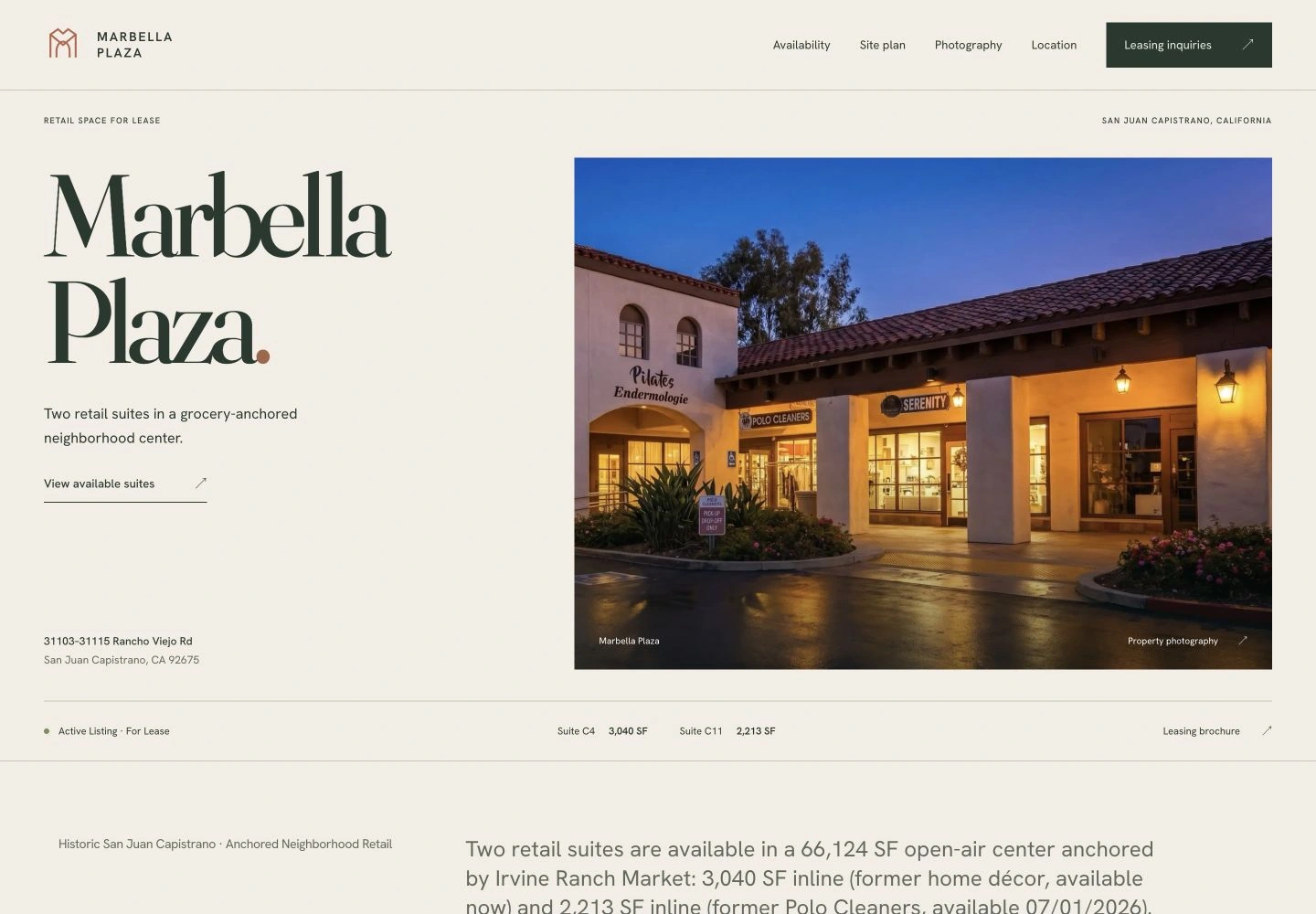
Many property pages live on a brokerage's or manager's website rather than on a domain the owner holds. That is a reasonable arrangement, and it has an end date built in. The brokerage site Endcap built for Parker & Associates, Inc. gives each listing its own page with photographs, available-space information and documents, and those pages belong to the brokerage's site. The 5801 Lincoln property page is hosted by Endcap, with KFS Properties as the leasing contact. For Marbella Plaza, Endcap produced the property website and leasing brochure for a center leased by Parker & Associates, Inc.
In each arrangement, the owner should know where the page lives, who can change it, and what happens to it when the assignment ends. The photographs, plans and property information behind the page are what the owner should be able to take to the next firm. What to do with a page after the space leases is covered in what to do with a property website after the space leases.
An order that avoids a gap in access
- Build the inventory using the table above, with the current holder and a contact for each item.
- Add the ownership entity and the incoming manager as users on every account before anyone is removed.
- Transfer ownership of the domain, the Google profile and the analytics property to the ownership entity.
- Collect the files: photographs with their licenses, brochure and site plan sources, and sign artwork.
- Wait out the platform waiting periods and confirm that the new access works.
- Remove the outgoing firm's users and Search Console tokens, change shared passwords, and update the phone numbers and contact details everywhere they appear.
- Check the public result a month later: Google Maps, both portals, the website and the signs.
What to put in the next management agreement
The simplest way to avoid a difficult handoff is to agree on it at the start. Ask your attorney whether the management agreement should say that domains, profiles and analytics are registered to the ownership entity, that photography and design work commissioned for the property is licensed or assigned to the owner, that source files are delivered with finished work, and that the manager will cooperate with a transfer within a set number of days after the agreement ends. Incoming managers can offer the same terms, which gives owners a concrete reason to trust the new firm with the accounts.
Endcap has recovered a website from an expired host before. For Great OC Condos, a ten-home residential portfolio in Laguna Hills, the previous site was a 2013 iWeb export with an expired-hosting banner, and Endcap recovered 19 pages and 53 photographs before building the new identity and website. If you are changing managers and want the property's website and materials set up so the owner holds them, see property management websites and property websites. The owner-facing side of a management firm's own site is covered in property management website design.
Work with Endcap Design
Shopping center websites
We build shopping center websites that serve shoppers and prospective tenants: a tenant directory, available suites, plans, photos, and a leasing contact.

Included
- Tenant directory and leasing information on one site
- Mobile layout and a broker inquiry form
- Two revision rounds, with launch checks on every page and download
From $1,950 · Up to 5 pages, 20 tenant entries, and 10 availability entries · Hosting and updates quoted separately
We agree on the scope, timing, and price with you before work begins.
Get a quote for your center's websiteSee the full service ↗Contact Endcap
START A
project.
A website, a brochure, or a complete set of materials.
We’ll agree on the scope, timing, and price before starting.