Marketing
Leasing signs and QR codes that actually get scanned.
A leasing sign is the only marketing you own that reaches someone already standing on the property. The code printed on it is the shortest path from that moment to a page you control. Most of the codes we see in the field are too small for the distance, aimed at the wrong destination, and never measured. Here is how to design one that works, and how to tell afterward whether it did.
The sign reaches people nothing else can
Portals reach people who are already searching. Email reaches people who already know your name. A panel on the building reaches the operator driving the corridor looking for a second location, the owner of the parcel next door, the franchise scout doing a Saturday loop with a spouse in the passenger seat. Those inquiries tend to be the most serious ones a listing produces, and they come from people who never typed anything into a search bar. The sign is also the piece of marketing you are least likely to revise once it goes up, which is a good argument for getting it right on the first print run.
Two pieces of California law shape what goes on the panel. Civil Code Section 713 protects the right of an owner, and of the broker the owner authorizes, to display a sign advertising the property for sale, lease, or exchange, and limits how far a local ordinance can go in restricting it. Cities can still regulate size, height, setback, and how long a temporary sign stays up, so read the municipal sign code before ordering. Business and Professions Code Section 10140.6 requires a licensee to include their license number on solicitation material, and a leasing sign is solicitation material.
Why most leasing QR codes are decoration
The code itself fails for reasons that have nothing to do with whether people are willing to scan. Every current iPhone and Android camera reads QR natively, with no app in between. Willingness is not the problem. Physics and placement are.
- Too small for the distance. Denso Wave, the company that developed the QR standard, puts practical scanning range at roughly ten times the width of the code. A three-inch code wants a phone about thirty inches away. Printed at the top of a pole sign twelve feet in the air, it is not a marketing asset, it is a texture.
- No quiet zone. The QR specification, ISO/IEC 18004, calls for a clear margin of four modules on all four sides. Codes bled to the edge of a panel, dropped onto a photograph, or reversed to white on a dark field are the ones prospects try twice and abandon.
- Glare. A gloss laminate on a west-facing panel at four in the afternoon is a mirror. Matte finish, every time.
- Placed where no one can stand. The code belongs on the rider, the window decal, or the lower panel nearest where a car actually stops, at roughly eye height for a person on foot. High and centered looks balanced in the proof and is useless on the street.
- It leads somewhere useless. The most common failure, and the one worth its own section.
The text on the sign follows a different rule than the code. The legibility research published by the United States Sign Council Foundation is the standard reference here, and the working version of it is about one inch of letter height for every ten feet of viewing distance. That governs the words FOR LEASE, the square footage, and the phone number, which is the part a driver reads at speed. The code is for the person who has already stopped.
Where the code should point
The worst destination is a brokerage homepage. Someone standing in a parking lot with a specific building in front of them lands on a company overview and a team grid, then has to find the property from a menu on a phone. Most do not.
The second worst is a PDF. A flyer opened on a phone is a pinch-and-zoom exercise with no lead capture, no way to route an inquiry, and no analytics beyond the fact that a file was fetched. Flyers are good documents and bad landing pages.
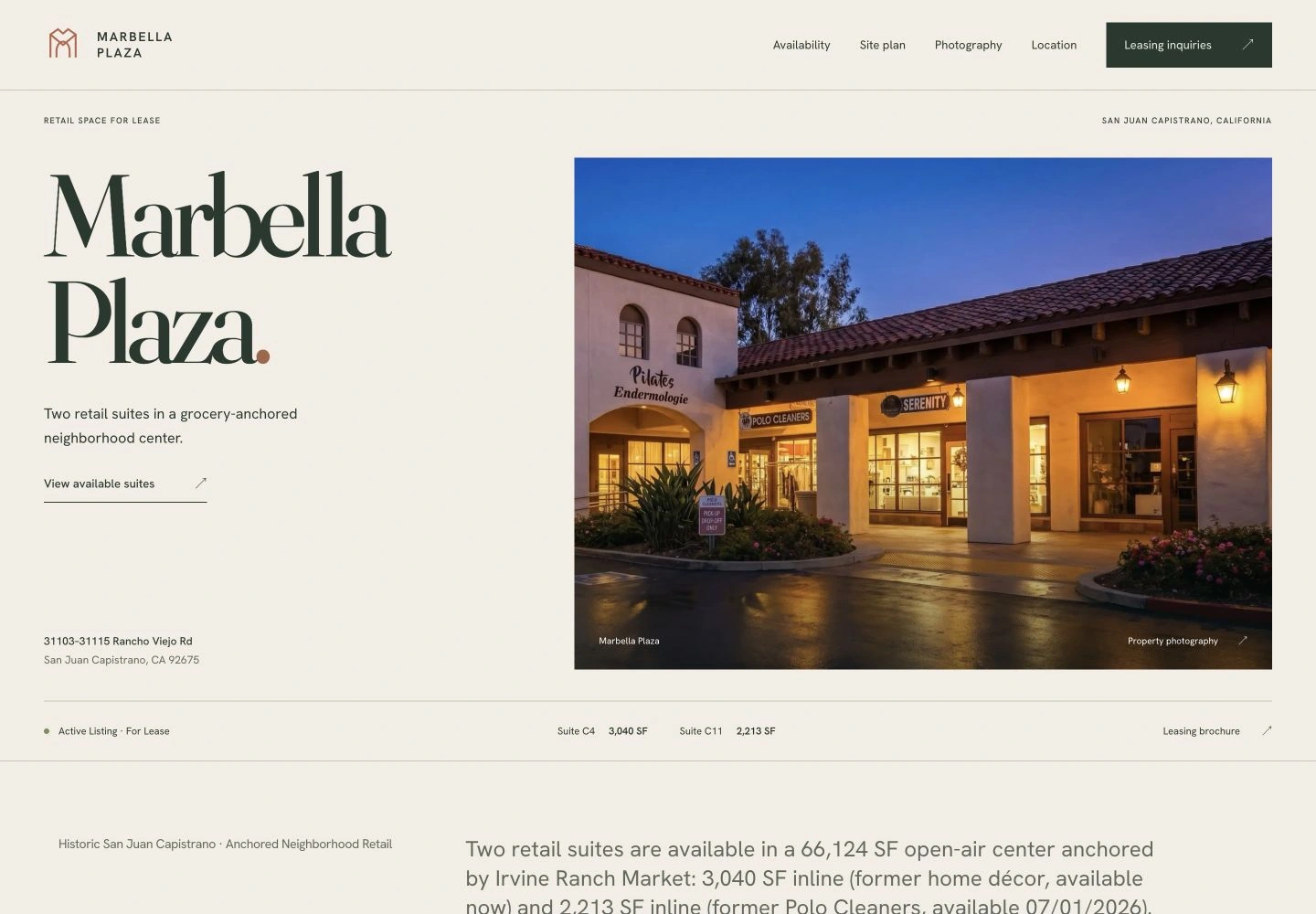
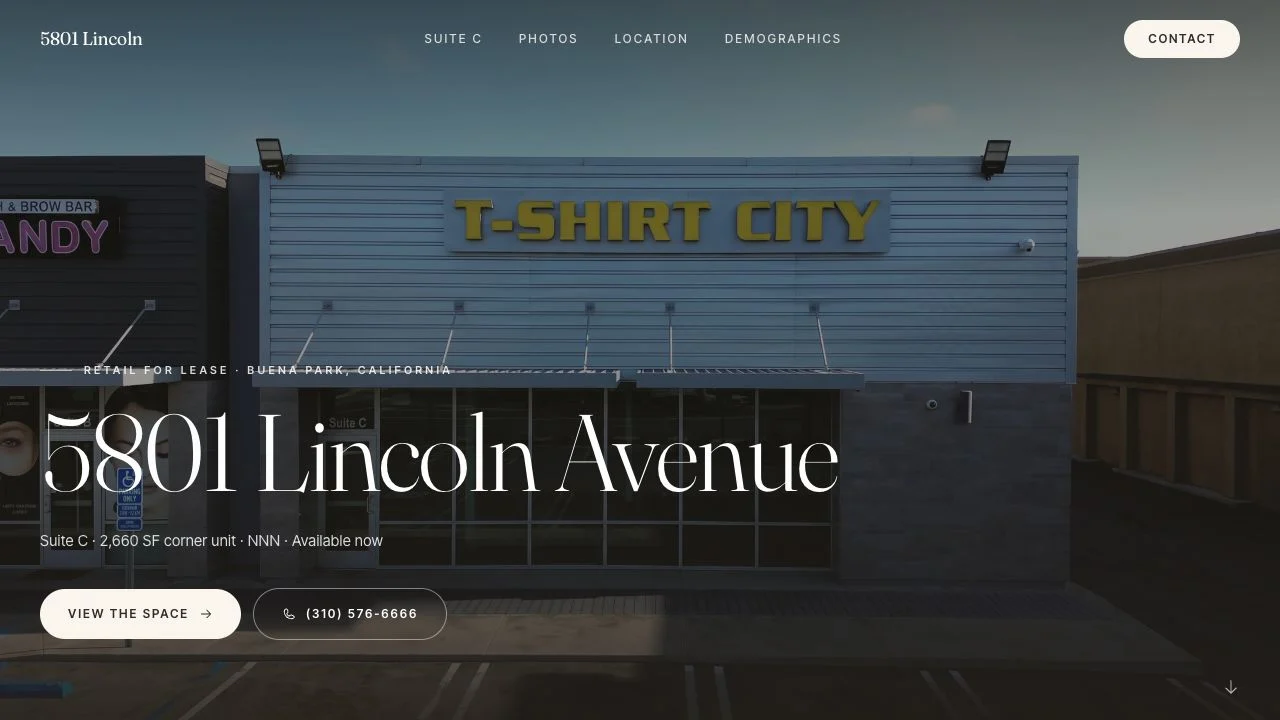
The destination should be a page built for that one property: the suites and their status, the site plan, the trade-area numbers with their sources, the photography, the flyer available as a download rather than as the whole experience, and a form that routes the inquiry to the listing broker with the suite attached. That is the case we make at length in our piece on single-property websites, and the sign is where the argument gets its sharpest test. You can see two live versions of it in the Marbella Plaza case study and the 5801 Lincoln case study.
Speed matters more on a scan than anywhere else on your site. The visitor is outdoors, in sun, on a cell connection, holding the phone in one hand. Google's Core Web Vitals guidance, published on web.dev, treats a Largest Contentful Paint slower than 2.5 seconds at the 75th percentile as needing improvement. A property page carrying a heavy template, a slider plugin, and an autoplaying hero video will not clear that from a parking lot, and the prospect will not wait to find out why.
A scan is the easiest yes a prospect will ever give you. Everything after it should cost them nothing.
What this looks like on our own listings
At 5801 Lincoln Ave in Buena Park, the listing is Suite C, a 2,660 SF corner unit in a three-tenant strip. The corner matters for signage: the City of Buena Park's GIS traffic layer puts 2025 average daily counts at 21,149 vehicles on Lincoln Ave and 41,574 on Valley View St. Cars stop at that intersection several times a minute, which is the condition a scan requires. The destination we built is a single long-scroll page with the suite facts, the floor plan, an annotated aerial with each road's count labeled, the demographics with their sources named, and an inquiry form and direct contact details for Ken Simon at KFS Properties. We also gave the flyer a stable link on the listing site, which means the seven-page PDF can be revised without invalidating anything that points at it, including a printed code. The three-day build is documented here.
Marbella Plaza is the other shape of the problem. It is a 66,124 SF grocery-anchored center, so there is no single suite to send anyone to. A code per vacancy would mean a code that has to be reprinted every time the rent roll changes. One code to the center's leasing page, with the interactive site plan carrying the current availability, means the panel stays correct through turnover and the page does the updating. For a multi-tenant center that is almost always the right structure.
We build the destination rather than the panel, so treat the fabrication advice above as what we have learned watching our own pages get reached. The part we control is making sure that what the code opens is current, fast, and capable of capturing the inquiry.
Static, dynamic, and the version we prefer
A static QR code encodes the URL directly. It is free, it never expires, and it can never be changed once printed. A dynamic code encodes a redirect through a vendor's short domain, which lets you repoint it later and gives you scan counts, in exchange for a subscription and a dependency: if that account lapses, every printed panel points at a dead link.
The version we prefer takes the useful half of each. Print a static code that points to a short path on your own domain, then handle the redirect server side. You keep the ability to repoint it, you keep the analytics, and you keep the domain, so nothing you printed depends on a vendor still being in business in three years. Short paths matter here because the human-readable URL should be printed under the code for the people who would rather type it.
Measuring it without guessing
Scan counts alone are a vanity number. What matters is what the scan turned into, and that requires the destination to be tagged before the sign is printed.
- Tag the link. Use campaign parameters on the redirect target, following Google's documented UTM conventions, with a source that identifies the physical sign. Scans from the panel then separate cleanly from email clicks and portal referrals in your analytics.
- Give each panel its own tag. A monument rider, a window decal, and a construction-fence banner are three different placements. Tag them separately and you learn which placement actually earns its cost.
- Count form completions, not sessions. The scan-to-inquiry rate is the number worth reporting to an owner. It also tells you whether the destination page is doing its job or just receiving traffic.
- Put the number in the owner report. Sign activity is one of the few things a landlord can verify with their own eyes, which makes it credible in a way portal view counts are not. More on the reporting side in our piece on where CRE leads actually come from.
The checklist before it goes to the printer
- Code at least four inches wide on a rider or decal, larger on anything read from farther than three feet.
- Quiet zone of four modules, dark on light, matte laminate, no photograph behind it.
- Error correction at level M or Q for a clean panel, level H, which recovers roughly thirty percent of a damaged code under ISO/IEC 18004, for anything exposed to weather or partial obstruction.
- Human-readable short URL printed beneath the code, and a phone number that stays on the sign. Plenty of prospects will never scan.
- Broker name, firm, and license number per Business and Professions Code Section 10140.6.
- Destination live and loading before installation day, then opened once from a phone on cell data rather than office wifi.
- Test scan from a parked car and from the sidewalk, on both an iPhone and an Android, in direct sun.
- Re-scan every panel quarterly. Codes outlive the pages they point to, and a dead link on a sign is worse than no code at all.
None of this is expensive. It is a fifteen-minute pass before a print order and a link that resolves to a page worth arriving at. If you want help with the second half, that is most of what we do: see our services for how projects are scoped.
Work with Endcap
Have a sign pointing at a page that isn't ready?
Work with Endcap Design
Property websites
We build a website for one property: your photo gallery, property facts, plans, brochure download, and a broker inquiry form.
Included
- Your photo gallery, property facts, plans, and brochure download
- A broker inquiry form and a layout for desktop and mobile
- Many sites launch in about a week once the material is ready
“We own ten homes at Casa De Laguna and were still sending people to a site built in 2013. Noah pulled the photos and details out of the old site, designed a logo from the rooflines and the pond, and put the community, the homes and current availability in one place. It’s the first time the website has looked like the place we actually rent.”
A one-page property website using your approved content · Two revision rounds
We reply within an hour during business hours, and we only use your details to answer you.
Get a quote for a property websiteOr email Noah at hello@endcap.design
See the full service ↗Contact Endcap
LET’S
talk.
A website, a brand, or a complete set of materials.
We reply within an hour during business hours, and we only use your details to answer you.
Let’s talk or email Noah at hello@endcap.design